
Reduces blurring of images due to camera shake.
Using the Image Stabilizer

Check whether the image stabilizer feature is turned ON or OFF.
If the image stabilizer icon (  /
/  ) does not appear on the screen display, the image stabilizer function is OFF.
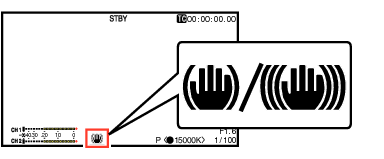
Press the [OIS/6] button to turn ON the image stabilizer feature (when image stabilizer feature is OFF).
The image stabilizer feature switches between ON and OFF with every press of the [OIS/6] button.
OFF:
Use this setting when the camera recorder is secured, such as when using a tripod.
ON:
Reduces blurring of images due to camera shake.
Memo
Select [Main Menu]  [Camera Function] [OIS] [Level] to set the correction level.
Correction by this feature may not be sufficient when camera shake is too strong.
“OIS” is assigned to the [OIS/6] button in factory default.
“OIS” can also be assigned to other user buttons.
