
Based on the setting of the selected “Color Profile”, you can adjust each of the following colors according to your preference: Red, Yellow, Green, Cyan, Blue, and Magenta.
Adjusting to your Preferred Color (Color Management)
TOPPress the [MENU] button to display the menu, followed by selecting “Picture Adjust”  “Color Profile” to display the “Color Profile” menu
“Color Profile” to display the “Color Profile” menu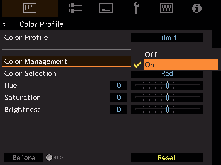
Set “Color Management” to “On”, and press the [OK] button
Adjust to the preferred color
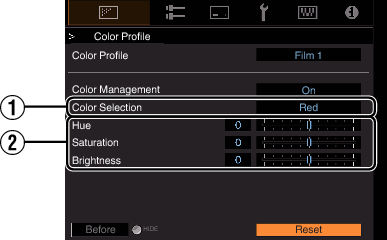

 keys to select the color to adjust
For color adjustment, select the color from the following: “Red”, “Yellow”, “Green”, “Cyan”, “Blue”, “Magenta”.
Adjust the selected color
|
Item |
Setting Range |
Description |
|---|---|---|
|
|
-30 to 30 |
Adjusts the hue (color tone). |
|
|
-30 to 30 |
Adjusts the color saturation (vividness). |
|
|
-30 to 30 |
Adjusts the brightness. |
Selecting “Reset” resets all the adjustment data.
Pressing the [HIDE] button on the remote control enables you to check the image before adjustment. Press the [HIDE] button again to return to the adjustment screen.
Press the [MENU] button to exit
 Picture Adjust
 Input Signal
 Installation
 Display Setup
 Function
 Information
