
Reset the lamp time when you have replaced the lamp. It provides an estimated timing for lamp replacement
Resetting the Lamp Time 

TOP
Resetting the lamp time from the menu screen
Press the [MENU] button to display the menu
Select “Function”  “Lamp Reset” from the menu
“Lamp Reset” from the menu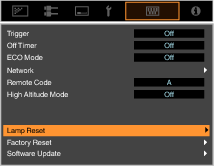
On the “Reset Lamp Time?” screen, select “Yes” and press the [OK] button
The lamp time is reset to zero.

MEMO
Reset the lamp time only when you have replaced the lamp.
If the lamp time is reset while a lamp is in use, you may lose track of the timing for replacing the lamp. Doing so may result in using the lamp beyond the estimated limit, thereby causing lamp blowout.
 Picture Adjust
 Input Signal
 Installation
 Display Setup
 Function
 Information