
> Using the Different Features (Using the App) > Phone operation
Phone operation
Identify the L and R sides of the earphones and put them on correctly. Wearing
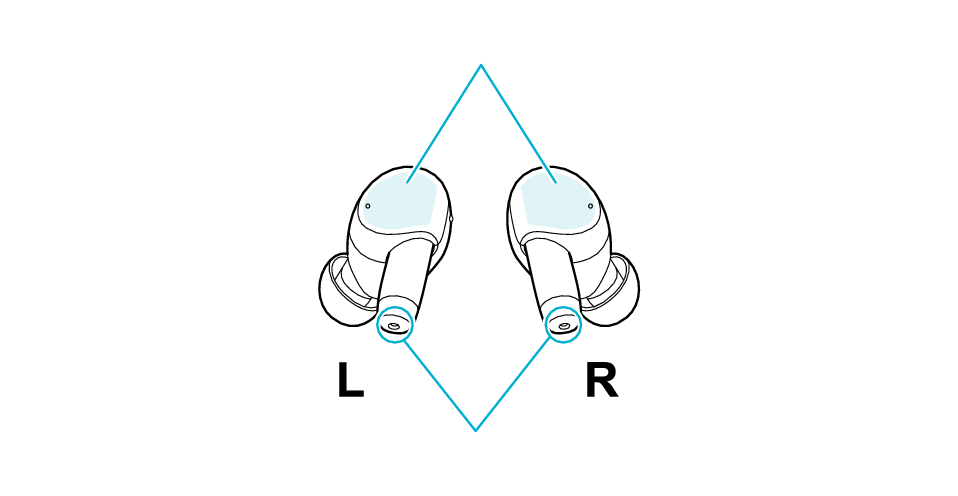
Touch sensor area
Microphone positions
Answering the call
Tap the touch sensor area on the L earphone once quickly.
Ending the call
Touch the touch sensor area of the L earphone for about 1 second during a call. Release your finger when you hear a beep sound.
Rejecting a call
Touch the touch sensor area of the L earphone for about 1 second when receiving a call. Release your finger when you hear a beep sound.
Muting/Unmuting the Microphone Temporarily During a Call
During a call, tap the touch sensor area on the L earphone once quickly. (Tapping it again quickly returns to the previous setting)
This is a function that mutes the microphone so that the other party cannot hear your voice. However, you can still hear the other party.
You will hear an audio guidance when the function is turned on/off.
When Switching Sidetone Mode to On/Off
During a call, tap the touch sensor area on the L earphone 4 times quickly.
It is a feature that picks up your own voice and ambient sounds during a call, allowing you to make calls in a manner that is close to normal conversations.
You will hear an audio guidance when the function is turned on/off.
Switching between the earphones and the smartphone during a call
During a call, tap the touch sensor area on the L earphone 5 times quickly.
Using voice assistant function (Siri etc)
Tap the touch sensor area on the L earphone 4 times quickly when not using the phone function.
Using the Noise Canceling/Ambient Sound Functions
Tap the touch sensor area on the R earphone once quickly.
Each quick tap will change the function as follows.

Noise canceling function
Ambient Sound Function
You will hear an audio guidance when the function is switched.
The noise canceling function is set to on when purchased.
Selected function can be switched by changing the setting of “Switching settings for control keys” in the app. You can choose an option from Noise Canceling, Wind Cut, Ambient Sound and Off.
Using the noise canceling function mainly helps to reduce ambient noises such as noise in a vehicle and noise from air conditioners in a room.
Using the ambient sound function allows you to hear your surrounding sounds.
Switching On/Off the Touch & Talk function
Touch the touch sensor area of the R earphone for about 1 second, and release your finger when you hear a beep sound.
When using the Touch & Talk function, the built-in microphone picks up external sounds and plays them through the earphones, making it easier to hear the surrounding sounds.
Some touch sensor operations may not be available on some call applications.
When using both earphones to make a hands-free call, you can toggle on/off the noise canceling function, ambient sound function and Touch & Talk function. Listening to music
We do not guarantee all operations of the BLUETOOTH device.
Check whether it is the L or R earphone, and fit it correctly to the ear. Wearing
The L earphone is used in the illustration.

Touch sensor area
Microphone positions
Answering the call
Tap the touch sensor area once quickly when receiving the call.
Ending the call
Touch the touch sensor area for about 1 second during the call and release your finger when you hear a beep sound.
Rejecting a call
Touch the touch sensor area for about 1 second when receiving the call and release your finger once you hear a beep.
Muting/Unmuting the Microphone Temporarily During a Call
Tap the touch sensor area once quickly during the call. (Tapping it again quickly returns to the previous setting)
This is a function that mutes the microphone so that the other party cannot hear your voice. However, you can still hear the other party.
You will hear an audio guidance when the function is turned on/off.
When Switching Sidetone Mode to On/Off
Tap the touch sensor area 4 times quickly during the call.
It is a feature that picks up your own voice and ambient sounds during a call, allowing you to make calls in a manner that is close to normal conversations.
You will hear an audio guidance when the function is turned on/off.
Switching between the earphones and the smartphone during a call
Tap the touch sensor area 5 times quickly during the call.
Using voice assistant function (Siri etc)
Tap the touch sensor area 4 times quickly when not using the phone function.
Some touch sensor operations may not be available on some call applications.
When using both earphones to make a hands-free call, you can toggle on/off the noise canceling function, ambient sound function and Touch & Talk function. Listening to music
We do not guarantee all operations of the BLUETOOTH device.