
 Picture Adjust
TOP
You can adjust the image quality according to the type of video image you are viewing.
You can configure the following setting items by pressing the [MENU] button to display the menu, followed by selecting “Picture Adjust”  “Picture Mode” and pressing the [OK] button.
Expands the dynamic range of video expression through controlling the brightness of the light source based on image analysis.
Adequate brightness control for some scenes may not be possible. In that case, set “Clear Motion Drive (C.M.D.)” to “Off”.
|
Setting |
Description |
|---|---|
|
Off |
Does not control. |
|
Mode 1 |
Expands the dynamic range of video expression. |
|
Mode 2 |
Expands the dynamic range of video expression. |
For changing the brightness through controlling the light source output.
|
Setting |
Description |
|---|---|
|
Low |
Brightness (low) |
|
Mid |
Brightness (mid) |
|
High |
Brightness (high) |
For changing the brightness through controlling the aperture.
Setting range: -15 (stops down) to 0 (opens up)
You can edit the “User 1” to “User 6” names in the Picture mode.
Characters that are usable include alphabets (upper or lower case), numeric characters, and symbols.
Enter not more than 10 characters.
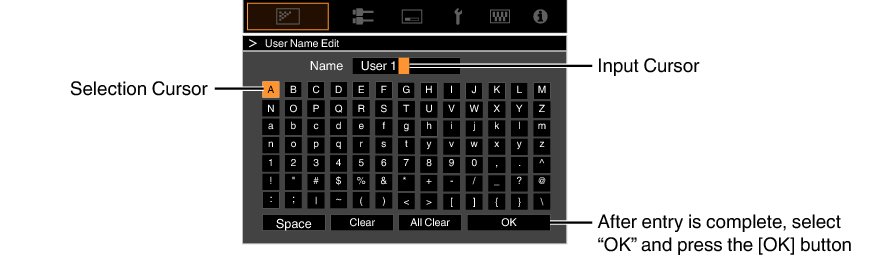
Color Profile
By setting the “Color Profile” (color space information) according to the “Picture Mode”, you can fine-tune the image quality according to the movie you are viewing.
Each of the colors is adjustable according to the user’s preference.
For setting the color temperature of the video image.
When “Picture Mode” is set to “THX”, the setting is fixed at 6500K.
The selectable “Color Temp.” settings vary according to “Picture Mode”.
“Color Temp.”
|
Color Temp. |
Description |
|---|---|
|
Xenon 1 |
Color temperature that reproduces the characteristics of a xenon lamp used in cinemas. Xenon 1: A light source color that is emitted by a film projector Xenon 2: A light source color emitted by a projector used for digital cinema |
|
Xenon 2 |
|
|
5500K |
Increasing the value enhances the blue tone of the video image, while decreasing the value enhances the red tone. |
|
6500K |
|
|
7500K |
|
|
9300K |
|
|
HDR |
Color temperature suitable for viewing HDR content. |
|
High Bright |
Color temperature that gives priority to brightness. |
|
Custom 1 to Custom 2 |
The color temperature of video images can be adjusted manually and saved as one of the three customized settings. |
List of selectable “Color Temp.” according to “Picture Mode”
|
Picture Mode |
Color Temp. |
|---|---|
|
Film |
Xenon 1 |
|
Xenon 2 |
|
|
Custom 1 to Custom 2 |
|
|
Cinema |
5500K |
|
6500K |
|
|
7500K |
|
|
9300K |
|
|
Xenon 1 |
|
|
Xenon 2 |
|
|
High Bright |
|
|
HDR |
|
|
Custom 1 to Custom 2 |
|
|
Natural |
5500K |
|
6500K |
|
|
7500K |
|
|
9300K |
|
|
High Bright |
|
|
HDR |
|
|
Custom 1 to Custom 2 |
|
|
THX |
6500K |
Correction Value
For setting the base color temperature for the adjustment of “Gain Red” / “Gain Green” / “Gain Blue” / “Offset Red” / “Offset Green” / “Offset Blue” when one of the “Custom 1” to “Custom 2” setting is selected in “Color Temp.”.
Gain Red / Gain Green / Gain Blue
Adjusts each color in the bright parts of the video image.
Setting range: -255 (reduces the red/green/blue tone) to 0 (no adjustment)
Offset Red / Offset Green / Offset Blue
Adjusts each color in the dark areas of the video image.
Setting range: -50 (reduces the red/green/blue tone) to 0 (no adjustment) to +50 (enhances the red/green/blue tone)
Setting “Color Temp.” to “Custom 1”, “Custom 2” or “HDR” allows you to select and adjust a base correction value (initial value) for adjustment.
The selectable correction values vary according to “Picture Mode”. (Refer to the table below.)
List of selectable “Correction Value” according to “Picture Mode”
|
Picture Mode |
Correction Value |
|---|---|
|
Film |
Xenon 1 |
|
Xenon 2 |
|
|
Cinema |
Xenon 1 |
|
Xenon 2 |
|
|
5500K |
|
|
6500K |
|
|
7500K |
|
|
9300K |
|
|
High Bright |
|
|
Natural |
5500K |
|
6500K |
|
|
7500K |
|
|
9300K |
|
|
High Bright |
You can adjust the output value of the projected image with respect to the video signal input.
Correction Value
For setting the base gamma for the adjustment of “Picture Tone”, “Dark Level” and “Bright Level” when one of the “Custom 1” to “Custom 3” settings is selected in “Gamma”.
Picture Tone
Adjusts the overall brightness automatically for a well-balanced result without compromising the gradation of the image.
Dark Level / Bright Level
You can adjust the image quality to produce a sharp contrast in the brightness.
You can enjoy natural, expressive 4K images with a stronger sense of depth.
Graphic Mode
For selecting whether the content you are viewing is of high sharpness such as graphics.
It is recommended to set to “4K” when viewing content mastered in 4K.
Setting values: 4K, 2K
Enhance
For adjusting the high-frequency areas. Increasing the value enhances the definition for a sharper image quality.
Setting range: 0 to 10
Smoothing
For adjusting the low-frequency areas. Increasing the value enhances the blurriness of the image for a softer effect.
Setting range: 0 to 10
NR
Prevents noise from becoming too pronounced.
Setting range: 0 (weak) to 10 (strong)
For reducing the after-image, which occurs in a fast-moving scene.
For adjusting the white level point to avoid clipping or over saturation.
Setting range: -50 (little difference in brightness) to +50 (large difference in brightness)
For adjusting the black level point to avoid clipping or over saturation.
Setting range: -50 (darker) to +50 (brighter)
For adjusting the color density of the video image.
Setting range: -50 (lighter) to +50 (deeper)
For adjusting the hue of the video image.
Setting range: -50 (reddish) to +50 (greenish)
 Input Signal
 Installation
 Display Setup
 Function
 Information