
Indicator Display on the Main Unit
TOPMeaning of the front panel indicators
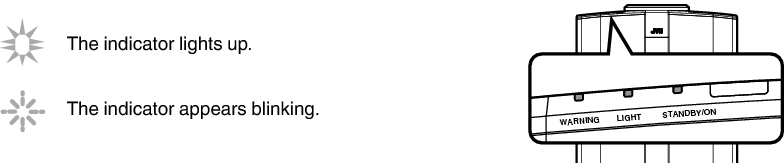
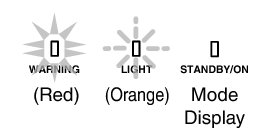
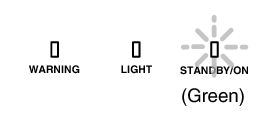
Operation mode display
Displays using the different colors and solid/blinking light of the indicator on the projector unit.
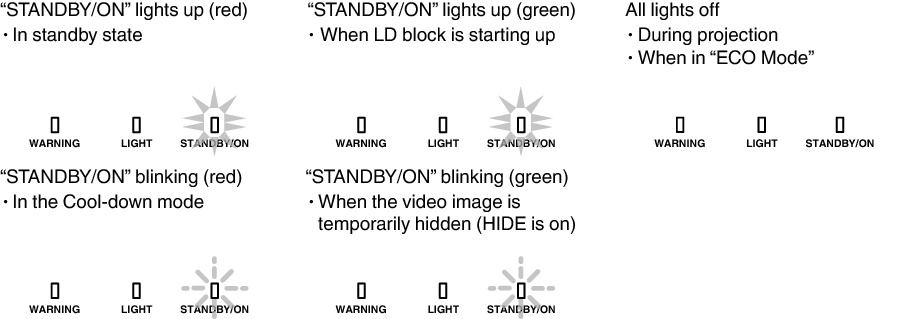
Warning display
You can tell the details of a warning from the (repeated) displays of the “WARNING” and “LIGHT” indicators. The “STANDBY/ON” indicator will light up or appear blinking according to the operation mode of the projector unit. (Please refer to “Operation mode displayLINK”.)
The Warning mode is activated once the message is displayed. Projection is interrupted, and the cooling fan is turned on for about 10 seconds.
The power cannot be turned on again while cooling is in progress. Check the following after cooling is complete.
|
Indicator Status |
Blinking Frequency |
Description |
Check and Countermeasure |
|---|---|---|---|
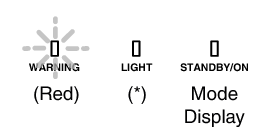 |
x2 |
Cooling fan stopped abnormally |
Check that nothing is blocking the air inlets. Check that the external temperature is normal. Countermeasure: Leave the unit unoperated until it cools down. After that, turn on the power again. |
|
x3 |
Internal temperature is abnormally high |
||
|
x4 |
External temperature is too high |
||
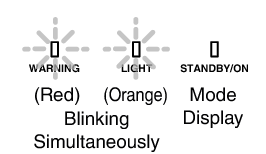 |
x1 |
Abnormal circuit operation |
|
|
x2 |
|||
|
x3 |
|||
|
x4 |
|||
 |
x1 |
||
|
x3 |
|||
|
x4 |
When the safety switch is activated |
Request for repair at your authorized dealer or a nearby service center. |
|
 |
x3 |
The remote control code differs between this unit and the remote control |
Set the remote control code for this unit and the remote control correctly.(LINK) |
If the Warning mode is activated again, wait for the cooling fan to stop, followed by pulling out the power plug from the outlet.
Request for repair at your authorized dealer or a nearby service center.
 Picture Adjust
 Input Signal
 Installation
 Display Setup
 Function
 Information