
 Function
TOP
For setting whether to supply a 12 V output to devices such as an external screen equipped with a trigger function.
|
Setting |
Description |
|---|---|
|
Off |
No output. |
|
Power |
Outputs control signals (12 V) from the trigger terminal when the power is turned on. |
|
Anamo |
Outputs control signals when the “Anamorphic” setting is switched from “Off” to “A” or “B”. |
|
Inst. Mode 1 to Inst. Mode 10 |
Outputs control signals when the “Installation Mode” number to be retrieved is the same as the number configured. |
When a setting other than “Off” is selected, the control signal output is stopped when the cooling function starts once the power is turned off.
For setting the duration before the power turns off automatically when the projector is not operated.
Setting values: “Off”, “1 Hour”, “2 Hours”, “3 Hours” and “4 Hours”
The setting will be retained even after the Off Timer operation has completed.
|
Setting |
Description |
|---|---|
|
On |
Enables “ECO Mode” to minimize power consumption in the Standby mode. RS-232C / LAN communication cannot be used in the Standby mode. If there is no signal transmission and operation for 20 minutes while an image is projected, the power management switches the equipment automatically into standby mode. |
|
Off |
Select this option to control via RS-232C / LAN communication in the Standby mode or if Control4 is to be used. |
If this unit enters into standby while “ECO Mode” is set to “On”, all the indicators on the unit including the “STANDBY/ON” indicator are turned off. To turn on the power from this state, use the [STANDBY/ON] button on the unit. Alternatively, press any button on the remote control once to cancel the standby mode then press the [ON] button on the remote control.
For specifying the settings for external control from a PC or smartphone.
|
Setting |
Description |
|
|---|---|---|
|
DHCP Client |
On |
Obtains the IP address automatically from the DHCP server inside the connected network. |
|
Off |
For configuring the network settings manually. |
|
|
IP Address |
For configuring the IP address. |
|
|
Subnet Mask |
For configuring the subnet mask. |
|
|
Default Gateway |
For configuring the default gateway. |
|
|
MAC Address |
Displays the MAC address of the unit. |
|
|
Set |
Applies the network settings. |
|
|
Control4 SDDP |
Set to “On” to allow Control4 SDDP to detect this unit. |
|
DHCP:
Abbreviation for Dynamic Host Configuration Protocol. This is a protocol for the network to assign an IP address automatically to the connected device.
IP Address:
Numeric characters for identifying the device that is connected to the network.
Subnet Mask:
Numeric characters that define the bit count used for the network address that is a segment of the IP address.
Default Gateway:
Server for communicating beyond the network that is divided by the subnet mask.
MAC Address:
Abbreviation for Media Access Control address. This is a number that is unique to each network adapter. Each of the network adapters is assigned with a unique MAC address.
For changing the remote control code.
|
Setting |
Description |
|---|---|
|
A |
Change the remote control code from “B” to “A”. |
|
B |
Change the remote control code from “A” to “B”. |
You need to configure the remote control according to the settings of this unit.
On the remote control unit, press the [MENU] and [BACK] buttons at the same time for three seconds or longer to switch the code.
The backlight of the remote control blinks 3 times: change the remote control code to “A”
The backlight of the remote control blinks 2 times: change the remote control code to “B”
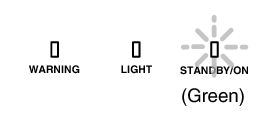
If the setting differs between this unit and the remote control, the “STANDBY/ON” indicator blinks in green when receiving the remote control code.
For reducing the power consumption through suppressing the current supply for the LD block when the [HIDE] button is pressed to hide the image temporarily.
|
Setting |
Description |
|---|---|
|
Off |
Do not suppress the current supply when the [HIDE] button is pressed to hide the image temporarily. |
|
On |
Suppresses the current supply when the [HIDE] button is pressed to hide the image temporarily. |
For restoring the settings of this unit to the factory default. However, the following settings will not be reset.
Gamma data saved in “Gamma”  “Correction Value” “Import”.
Color profile data saved in “Color Profile” “Custom1 to Custom6”.
For performing a software update.
For the latest information on the software, refer to http://www3.jvckenwood.com/english/download/.
 Picture Adjust
 Input Signal
 Installation
 Display Setup
 Information