
Clean the filter regularly. Using a filter without cleaning may reduce the brightness of the image. Dirt that enters the unit may also appear as shadows on the image.
Cleaning and Replacing the Filter
TOP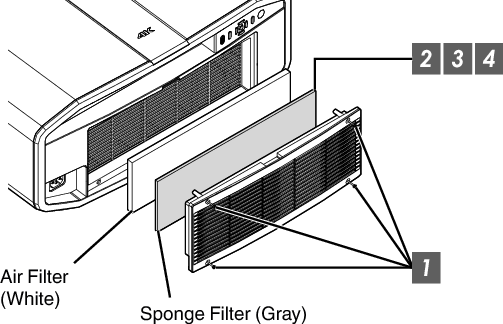
Loosen the 4 screws and remove the cover
The screws cannot be removed from the cover. Do not try to remove the screws from the cover by force.
Remove the sponge filter
Use a vacuum cleaner to remove dirt from the sponge filter carefully
Restore the sponge filter
Restore the cover and fasten the 4 screws
CAUTION
Do not wash the air filter with water. Doing so may cause the filter to deteriorate.
Make sure to attach the air filter and sponge filter in the correct sequence.
MEMO
Air filter
Product no.: F1K-0062-00
Sponge filter
Product no.: J3K-0049-00
 Picture Adjust
 Input Signal
 Installation
 Display Setup
 Function
 Information